


Coding agents are remarkably good at building things. They scaffold databases, wire up auth, and deploy functional apps in minutes. What they consistently fail to do is secure what they’ve built.
The numbers bear this out. Security researchers found that 83% of exposed Supabase databases involved Row Level Security misconfigurations. The Moltbook breach alone exposed 4.75 million records, including 1.5 million API tokens. A CVE against Lovable revealed 170 more AI-generated apps, all with completely open databases. In each case, the pattern was the same: the app worked, the data was exposed, and the developer didn’t know.
If you’ve built a Supabase project with a coding agent, here’s how to find out where you stand.
What to check first
Supabase gives you a Postgres database with auto-generated REST APIs, auth, and storage out of the box. That convenience is why coding agents reach for it, and why these security gaps are so common. Before you start, install the Supabase CLI if you haven’t already. Between the CLI and the Dashboard’s Security Advisor, you can run a full security audit locally before you ever ship.
Three things matter most, in order of severity.
RLS on every table
Row Level Security is the single most important security control in Supabase. It determines who can read and write which rows. Without it, anyone with your project’s public API key (which is embedded in your frontend JavaScript, by design) can query your entire database.
The critical detail: RLS is disabled by default on tables created via SQL or migrations. Tables created through the Supabase Dashboard have had RLS enabled by default since 2025, but if your coding agent generated migration files or ran SQL directly, it may have skipped this step.
How to check: Open your Supabase Dashboard, navigate to Database > Security Advisor, and look for an error mentioning “RLS Disabled”.
This flags any table in the public schema without RLS enabled. If you see results here, enable RLS immediately and add appropriate policies before doing anything else. Supabase’s Hardening the Data API guide covers additional measures worth reviewing, including restricting table-level grants and exposing a custom schema instead of public.
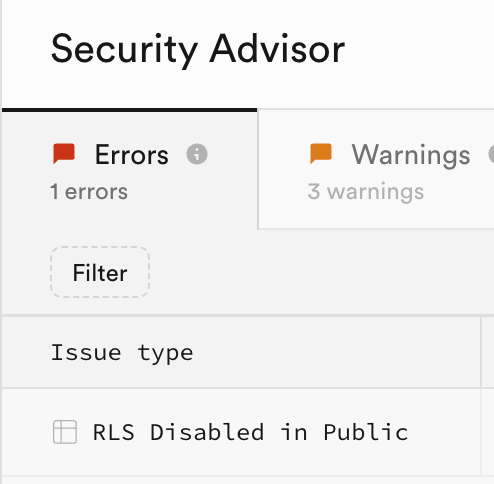
If you don’t use Supabase’s REST or GraphQL API at all (for example, you only connect via a backend, not a web app), consider disabling the Data API entirely under API Settings. No API surface means no API exposure.
It helps to understand the two layers at work. Table-level privileges control which operations are possible (SELECT, INSERT, UPDATE, DELETE). RLS policies control which rows are accessible. You need both. A table without RLS has the first layer but not the second, meaning anyone with API access can operate on every row.
One nuance: enabling RLS without adding any policies doesn’t expose data. It does the opposite. It locks everyone out, including your application. That’s a different kind of broken, but at least it’s not a breach. Add policies after enabling RLS, not before.
One performance detail worth knowing: if you’re writing policies that check auth.uid(), wrap it in a subquery as (select auth.uid()). Without the subquery, Postgres re-evaluates the function for every row. With it, Postgres evaluates once per query.
Service role key exposure
While I was writing this piece, Supabase overhauled their API key model. The timing is relevant. New projects now get publishable keys (sb_publishable_...) for frontend use and secret keys (sb_secret_...) for backend operations. Secret keys cannot be used in browsers at all. They return a 401. If a coding agent accidentally drops a secret key into your frontend code, it won’t work there. That’s a safety net the legacy service_role key never had.
But a published secret key is still a serious problem. It won’t work in a browser, but anyone who finds it can use it from a backend script to bypass all RLS and access your entire database. Search your codebase for any elevated key: .env files that might be committed, client-side code, configuration that gets bundled into your frontend. Coding agents sometimes use elevated keys during development because it’s the path of least resistance. If one is exposed anywhere, rotate it immediately from your Dashboard, then refactor the app to not require it.
If your project still uses legacy keys (check your Dashboard under API Keys), the same principle applies. The anon key is public by design, safe as long as RLS is doing its job. The service_role key bypasses all RLS. Legacy keys are deprecated and will be removed late 2026. Migrating to the new model gives you instant revocation and per-key access logging.
Storage bucket policies
Storage security follows the same RLS model as database tables, and it’s the thing most people forget to check. If you’re storing user uploads, verify that your storage policies restrict access to the file owner. The common pattern is folder-based: each user’s files live under a folder named with their user ID, and the policy enforces that boundary.
Without storage policies, uploaded files are accessible to anyone who can guess (or enumerate) the file path.
What I found on my own project
I opened the Dashboard Security Advisor, and it found three warnings.
Two were functions with mutable search paths: update_updated_at_column and handle_new_user. These are common utility functions that coding agents generate. The risk: an attacker could trick your function into operating on the wrong table by creating a shadowed copy in another schema. Postgres resolves unqualified references by searching schemas in order, so without an explicit search_path set, a shadowed name takes precedence. The fix: pin the search path to an empty string (SET search_path = '') so all references must be fully qualified.
The third was more interesting. My beta_signups table had an RLS policy called “Anyone can sign up for beta” with WITH CHECK (true) on INSERT. That means any anonymous user can insert rows into that table with no restrictions. For a beta signup form, that’s arguably intentional. But the Security Advisor flagged it because unrestricted INSERT policies can be abused for data pollution or storage exhaustion. Even when an open policy is deliberate, it signals the need for application-level defenses: rate limiting, CAPTCHA, or input validation to prevent abuse.
Beyond flagging problems, the Security Advisor links directly to remediation docs and offers an AI-powered assistant to help resolve each finding.
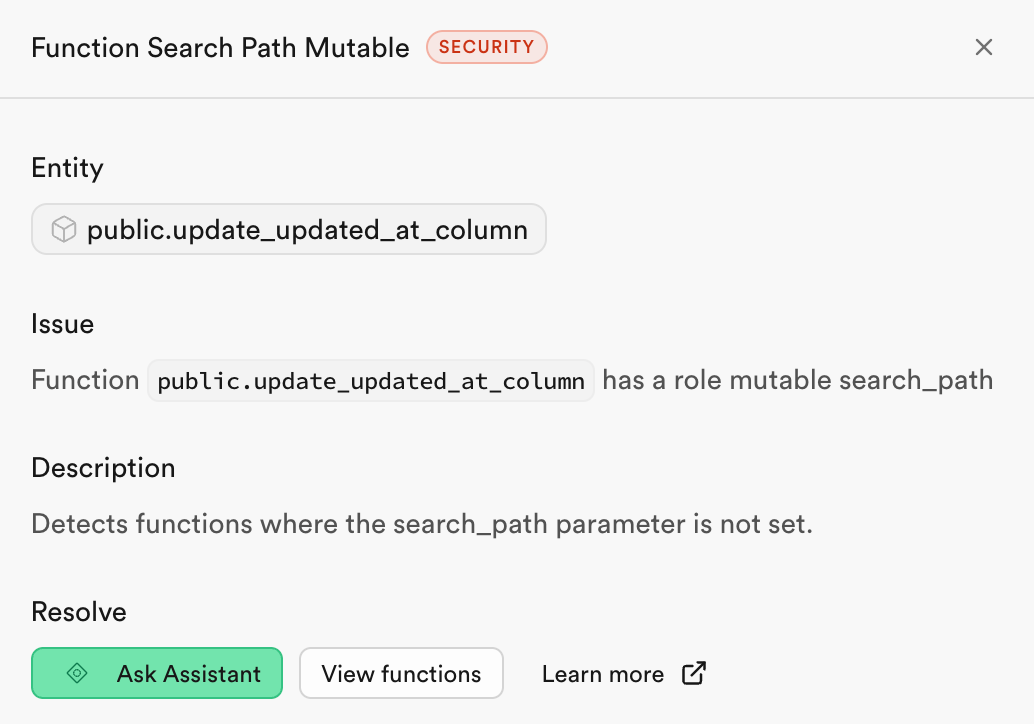
None of these findings were catastrophic. That’s not the point. The Security Advisor found issues in seconds that I hadn’t thought to look for. If you haven’t run it yet, do it now. It’s the fastest way to know where you actually stand.
Staying secure
The Security Advisor catches what’s already wrong. Keeping new problems from slipping in is the actual practice.
Catch it before it ships
If your project has a CI pipeline, the most impactful ongoing step is adding security checks to it. Two complementary layers cover different failure modes.
Layer 1: supabase db lint runs plpgsql_check against your PL/pgSQL functions. It catches typing errors, dead code, and SQL injection risks in EXECUTE statements. This is code quality for your database functions. Supabase provides an official GitHub Action (supabase/setup-cli) to install the CLI on your runner, then it’s one command: supabase db lint --fail-on warning.
Layer 2: Splinter is the rule engine behind the Dashboard’s Security Advisor. It catches the security configuration problems: disabled RLS, exposed auth tables, permissive policies, unindexed foreign keys. You can run Splinter directly in CI against your local Supabase instance. No production credentials needed.
I tested this on a real project. The workflow downloads splinter.sql, prepends the PostgREST schema config, and runs it via psql against the local database:
- name: Download splinter.sql
  run: |
    curl -sSfL https://raw.githubusercontent.com/supabase/splinter/main/splinter.sql \
      -o splinter.sql
    echo "SET pgrst.db_schemas = 'public, graphql_public';" > splinter_run.sql
    cat splinter.sql >> splinter_run.sql

- name: Run Splinter lint
  run: |
    DB_URL="postgresql://postgres:postgres@127.0.0.1:54322/postgres"
    RESULT=$(psql "$DB_URL" -f splinter_run.sql -t -A -F '|')
    echo "$RESULT"
    ERRORS=$(echo "$RESULT" | grep '|ERROR|' || true)
    if [ -n "$ERRORS" ]; then
      echo "::error::Splinter found ERROR-level issues:"
      echo "$ERRORS"
      exit 1
    fi
The pgrst.db_schemas setting is the key detail. Splinter needs to know which schemas PostgREST
exposes so it can check the right tables. Without it, you’ll get incomplete results.
When Splinter finds an ERROR-level issue (like a table with RLS disabled), the workflow fails and blocks the PR:
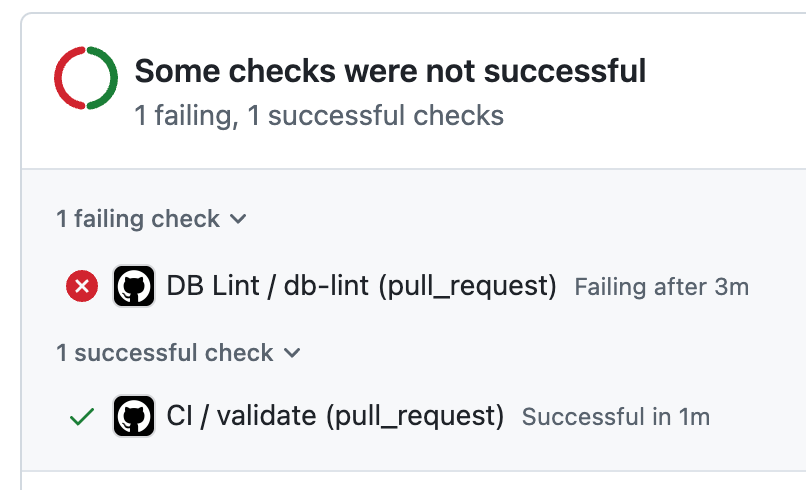
One practical detail: scope the workflow to only trigger on PRs that touch supabase/migrations/**. Frontend-only changes don’t need a database security check, and skipping it keeps your CI fast.
Security Advisor alerts
CI catches problems at deploy time. But if you don’t ship for a few weeks, new Splinter rules won’t reach your project through CI alone. That’s where the Security Advisor’s weekly email comes in. It re-evaluates your production database against the latest rules automatically. Verify you’re receiving these emails. As new lint rules get added (and they do, regularly), your existing tables get re-checked without you doing anything.
Test from the attacker’s perspective
Configuration checks have limits. CI lint and weekly emails check your configuration, but neither tests whether your policies actually prevent unauthorized access at runtime. A misconfigured policy could pass lint and still leak data. For that, you need to probe your own endpoints the same way an attacker would.
You don’t need a special tool for this. You know your own tables from your migrations. Test reads by querying the REST API with just the anon key, the same way an anonymous visitor would:
# Test reads — query as anonymous user (anon key only, no user session)
curl -s "$SUPABASE_URL/rest/v1/your_table?select=*&limit=5" \
  -H "apikey: $ANON_KEY" \
  -H "authorization: Bearer $ANON_KEY"
If you get data back from tables that should be private, your RLS policies have gaps. An empty array ([]) means RLS is doing its job. Test writes too — try inserting a row into a table that should reject anonymous inserts:
# Test writes — attempt anonymous insert
curl -s "$SUPABASE_URL/rest/v1/your_table" \
  -H "apikey: $ANON_KEY" \
  -H "authorization: Bearer $ANON_KEY" \
  -H "Content-Type: application/json" \
  -d '{"some_column": "test"}'
A 403 or empty response means the policy held. A 201 means anyone can write to that table. Repeat for each table in your schema. You can wrap this in a script that loops through your table names and flags unexpected access.
The Deepstrike research that found thousands of exposed instances used nothing more sophisticated than this: standard REST API queries with publicly available anon keys.
A note on AI agents with database access
If you’re using an MCP server to give an AI agent access to your Supabase database, configure it with read-only credentials scoped to specific tables. Security researcher Simon Willison identified what he calls the “Lethal Trifecta”: an AI agent with database access, exposure to user-submitted content (where prompt injection can hide), and the ability to exfiltrate data. Keep agent permissions minimal (least privilege). Never give an AI agent service role access.
The pattern
You can add Supabase security directives to your AGENTS.md or CLAUDE.md: “always enable RLS on new tables,” “never use the service_role key in client code.” These are useful. They’re also a trust exercise. You’re trusting the agent to follow instructions it has no incentive to prioritize over getting things working.
For security, trust but verify. And verify with code, not with another AI review pass. A deterministic check in your CI pipeline will catch a missing RLS policy every single time. A review agent might catch it. The distinction matters when the cost of missing it is your users’ data.
Coding agents optimize for getting things working. Security is a constraint that slows down the path to “it works.” So they skip it, consistently, across every AI code generation tool available today.
That’s not going to change soon. These tools are getting better at building, not better at securing. The responsibility sits with you. Run the Security Advisor. Add Splinter to CI. Both take less time than reading this article.