


When Your AI Coding Tool Becomes Your Teacher
I can build a working Tauri app without understanding Tauri. Claude will write the Rust backend, scaffold the Svelte frontend, wire the IPC bridge, and hand me something that compiles and runs. For a one-off tool, that’s fine. For a framework I plan to work with long-term, it’s not enough. I need to understand how the pieces connect so I can evaluate what AI generates, debug when things break, and make architectural decisions the AI can’t make for me.
The question isn’t whether to use AI. I let Claude write most of my code for side projects, and I have no intention of changing that. The question is what to do when you’re picking up something new and you actually need the mental model, not just the output. The conventional wisdom is to set AI aside and learn the old-fashioned way. I tried a third option.
The cost of skipping the mental model is measurable. A randomized controlled trial by Anthropic found that developers who used AI assistance scored 17 percentage points lower on code comprehension tests compared to those who coded by hand. The largest deficit appeared in debugging, the exact skill you need to evaluate AI-generated code. As Unmesh Joshi wrote on Martin Fowler’s blog, LLMs can threaten the learning loop essential for building expertise. Design emerges through implementation struggle, not pre-planning. Remove the struggle, remove the learning.
Same Tool, Opposite Outcome
What caught my attention was a Wharton School study published in PNAS. The researchers didn’t just test unfettered AI access. They also tested AI with pedagogical guardrails, a version they called “GPT Tutor.” The unguarded version caused a 17% performance decline. The guarded version almost entirely eliminated the negative effects.
Same tool. Different constraints. Opposite outcome.
That finding aligned with something I’d been experimenting with: using Claude Code not as a code generator, but as a learning partner. Claude Code has a Learning output style that changes its behavior from “implement everything” to “teach by building together.” Instead of writing all the code, it leaves strategic gaps marked TODO(human) for you to implement, and wraps its work in Insight blocks that explain why things are done the way they are.
The Learning output style was the foundation. What I built on top of it was a harness that turned Claude Code into a structured learning environment.
The Learning Harness
Tauri is a framework for building desktop and mobile apps with web frontends, similar to Electron but with a Rust backend instead of Node.js. The project I chose as my learning vehicle is NatLang Todo: a desktop app built with Tauri 2 (Rust backend, Svelte 5 frontend) where the only input surface is natural language. No forms, no buttons. You type what you want in a chat interface, a local LLM classifies the intent, and Rust executes the operation. That design pushes roughly 70% of the complexity into the Rust backend, which is exactly where the learning goals live.
The harness has four layers.
The first layer is the Learning output style itself. When enabled, Claude Code shifts its approach at decision points. Instead of implementing a function, it writes the surrounding code (file structure, imports, signatures, context comments), then marks the strategic gap with TODO(human) for you to implement. It explains the trade-offs you should consider. It provides the context. You write the meaningful code. The harness adds structure on top: a directive in CLAUDE.md ties each TODO(human) to a specific learning goal ID from the curriculum, so both you and the agent know which concept is being exercised.
Here’s what that looks like in the editor. When I needed to define the core data model, Claude created the models.rs file with the TodoStatus enum already implemented (including derive macros for serialization), a test verifying enum equality, and the TODO(human) [F2] marker where I needed to define the Todo struct:
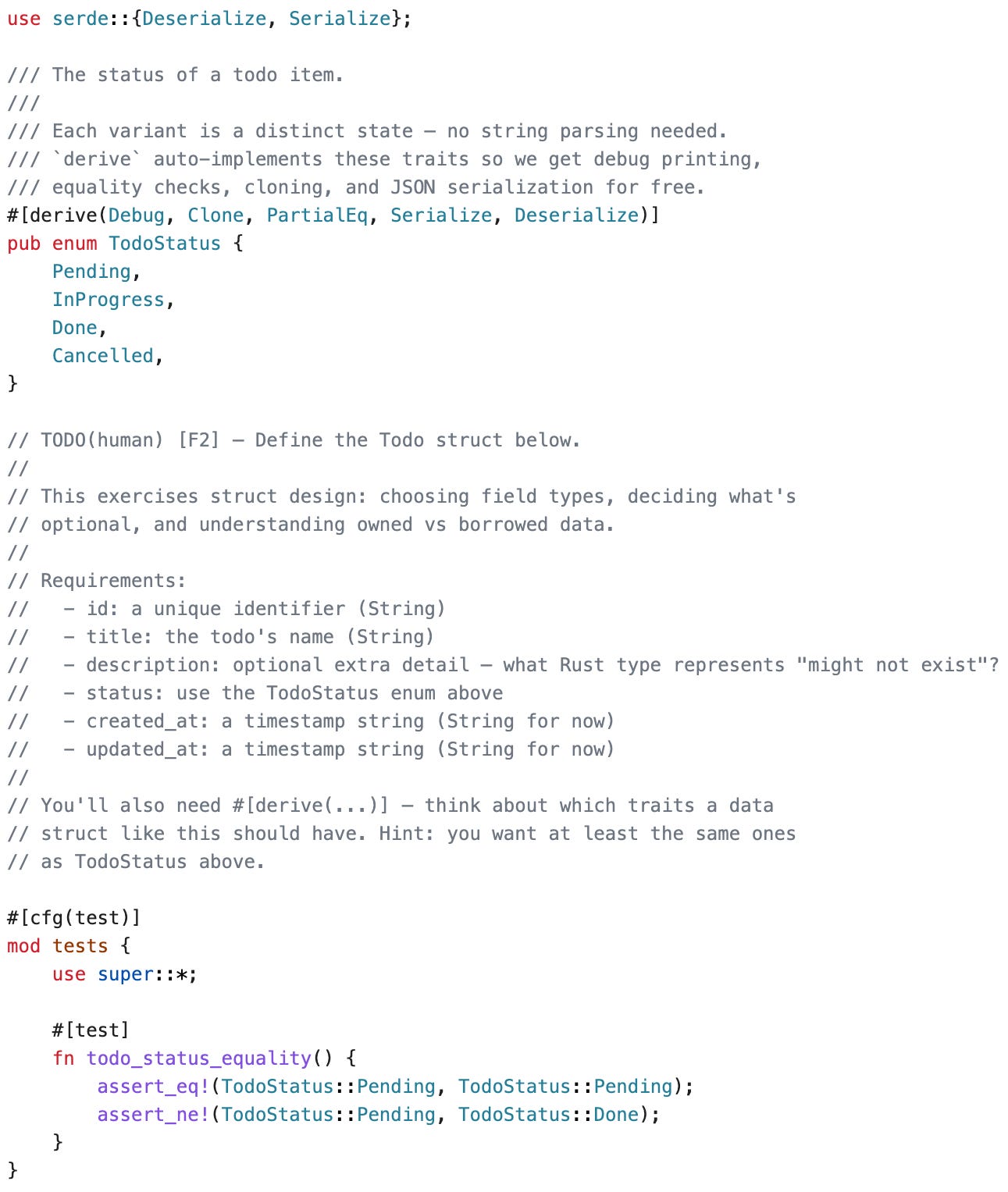
The agent didn’t just leave a blank. It listed the six fields I needed, posed the conceptual question (”what Rust type represents ‘might not exist’?”), and hinted that I should think about which traits the struct needs. I had to decide. I had to think about Option<T>. That moment is where learning happens.
The second layer is CLAUDE.md as curriculum. The project’s CLAUDE.md file references a learning-goals.md file containing 7 foundational Rust goals and 11 applied Tauri/Svelte goals, organized into 10 progressive build phases. It directs the Learning mode to tie TODO(human) markers to specific goal IDs, calibrate for the learner’s current phase, and avoid introducing concepts from later phases prematurely.
The CLAUDE.md also encodes three validation techniques borrowed from established pedagogy. After you complete a TODO(human), the agent might ask: “Explain what you just did. Why did you use &mut self here instead of self?” If you can only say “the compiler told me to,” the concept hasn’t landed. Before running tests, it asks you to predict: “What do you think cargo test will show?” Wrong predictions reveal gaps between your mental model and reality. After a concept is demonstrated, it asks you to modify the code in a way that exercises the same concept differently. If you can adapt without hand-holding, you understand it.
Claude Code hooks are automated actions that fire on specific events. The third layer is a SessionStart hook that injects your current build phase and unchecked goals into every new session. When you open the project tomorrow, the agent already knows where you left off. You never have to re-explain your progress. It fires on startup and after context compaction, so continuity is maintained even in long sessions.
The fourth layer is a /checkpoint skill invoked by the user at the end of each session. It reads your learning goals and recent git history, maps file changes to the goals you exercised, and asks targeted reflection questions. It updates the Notes field for each goal with dated entries capturing what clicked, what’s still fuzzy, and what evidence items to check off. This creates a structured learning record separate from Claude’s built-in memory. Memory handles where to resume. Checkpoint handles what you understood.
The four layers chain into a loop:
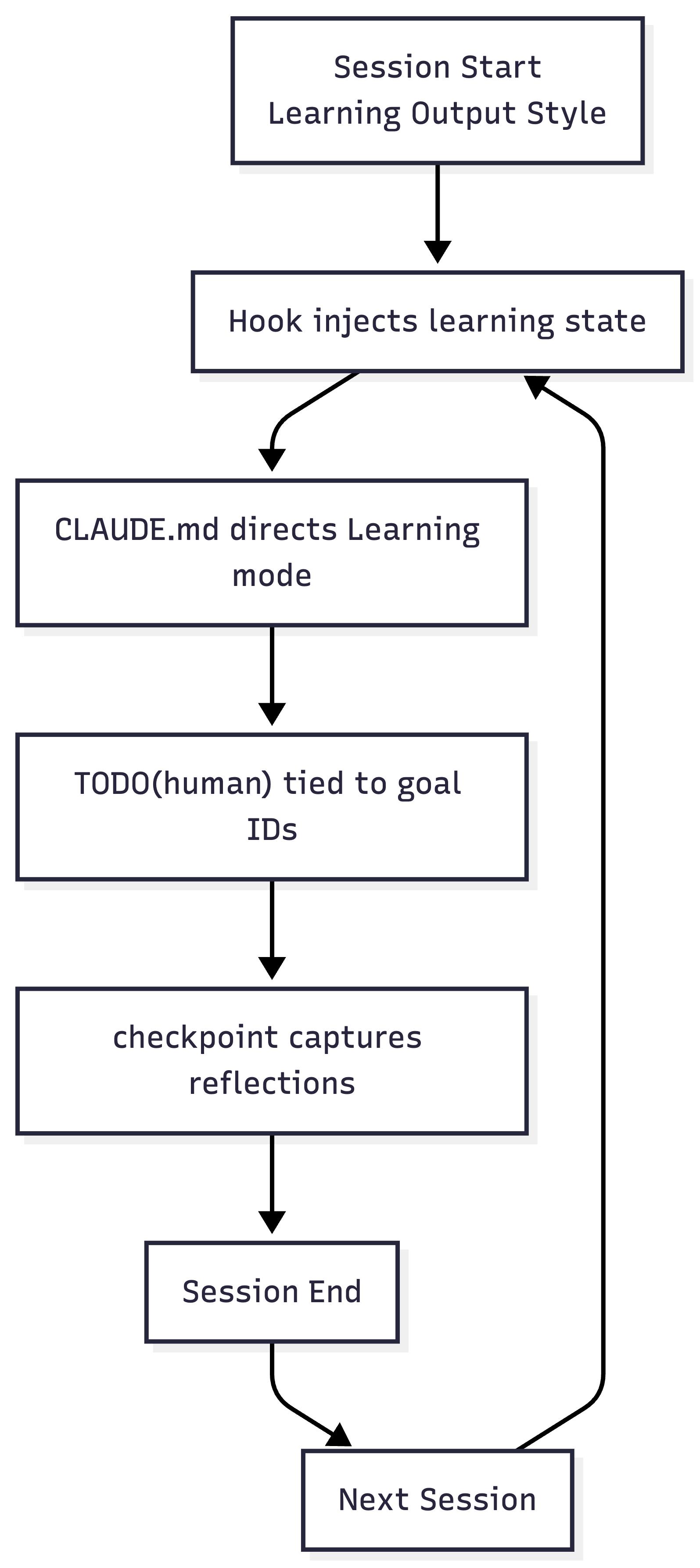
Here’s what that continuity looks like in practice. Opening a new session, the agent picks up where we left off and moves into the next lesson:
What I Learned By Building It (And Using It)
The framework didn’t work correctly the first time. Several assumptions I made during design failed during testing, and the fixes are where the interesting insights live.
Here’s a checkpoint from an early session. The agent maps recent git changes to learning goals, checks off evidence items that were demonstrated, and asks validation questions before updating the record:
Working code is not proof of understanding. My original learning goals were aspirational: “Can explain why Rust has ownership.” The problem was that the agent couldn’t validate these. Tests passing doesn’t prove the learner internalized the concept. I rewrote every goal as observable evidence: “Fixed a borrow checker error by changing self to &self and explained why.” Now the agent checks goals off when it sees the learner do or say the specific thing. Most AI-assisted learning resources don’t make this distinction between tutorial completion and verified learning. It maps directly to what the ACM study on novice programmers calls the “illusion of competence”: students who used GenAI thought they performed better than they did. Observable goals are how you prevent that illusion.
Trust erosion is fast and expensive. During testing, the agent generated a Tauri documentation link that looked perfectly plausible. It 404’d. One bad link, and the learner’s confidence in every link the agent provides is damaged. In a learning context where you’re asking someone to trust the AI as a teacher, credibility is non-negotiable. I built a /docs skill that uses WebSearch and WebFetch to find and validate documentation links, and added a directive to CLAUDE.md: “Never fabricate a URL. Only use links from the reference list or validated via /docs.” The skill exists because the agent hallucinated once. That’s all it takes.
The Part That Surprised Me
I expected the harness to be useful. What I didn’t expect was how effective Claude’s learning persona would be in practice. The interactions didn’t feel like a tutorial or a chatbot. They felt like pairing with someone who had infinite patience and deep knowledge of Rust, but who also knew exactly when to stop explaining and let me struggle.
At any point during a session, I could go deeper. “Why does Rust have both String and &str?” would get a thoughtful comparison to Python/JavaScript equivalents, with a link to the relevant Rust Book chapter. Quick clarifications landed in two sentences. Conceptual deep-dives came with ASCII diagrams showing ownership flow. The agent calibrated based on what it had seen me understand in previous sessions, so it wasn’t re-explaining concepts I’d already demonstrated.
The repo itself is a bootstrapped Tauri app plus the learning framework I built around it. Beyond the Tauri bootstrap, the entire system is natural language: markdown directives, JSON config, and skill definitions. No custom code powers the learning experience. That matters because the harness is fully inspectable. Every directive is readable English. Adapting it for a different stack means rewriting markdown, not code.
Fork It, Adapt It, Make It Yours
A CodeSignal survey found that 76% of developers already use AI tools to learn new skills. It’s the number one use case, ahead of code generation. Developers want to learn with AI. The tools just aren’t designed for it yet.
The NatLang Todo repository is on GitHub. You can use it two ways.
Learn Tauri as-is. Fork the repo and open it in Claude Code. The Learning output style is already configured in the repo’s settings. Build a natural-language todo app through 10 progressive phases. The curriculum handles the rest: goal tracking, session continuity, reflection checkpoints, validated documentation links.
Adapt the pattern for your stack. The learning framework is applied here to Tauri, but it could be extracted and pointed at anything. Want to learn Go by building a CLI tool? Replace the learning goals, adjust the phase docs, point the documentation references at the Go standard library. The skills, hooks, and structural pattern carry over. A technical educator could fork this repository and adapt it without writing a line of Rust. Every directive is readable English. The CLAUDE.md-as-curriculum approach, the SessionStart hook for continuity, the /checkpoint skill for structured reflection. These are building blocks, not blueprints. Take the pieces that make sense for your context and leave the rest.
Do we still need to learn frameworks deeply in a world where AI can generate working code? I think so. Not because you need to memorize syntax, but because you need to understand how the framework is wired together. You need the mental model that lets you evaluate whether AI-generated code is correct, not just whether it compiles. The Anthropic study found that debugging, the skill most eroded by AI assistance, is exactly the skill you need to validate what AI produces. That’s a loop you don’t want to break.
The tool isn’t the problem. It’s how you choose to hold it.