


I have five Claude Code instances running right now. Two are implementing features across different services. One is writing tests. One is doing deep research for an upcoming article. The fifth is investigating a bug report. None of them know about each other, and none of them are stepping on each other’s work.
A few months ago, for me, this would have been five terminal windows, five mental threads to track, and a constant low-grade anxiety about which session was doing what. The terminal-per-agent workflow works right up until the cognitive load of managing it doesn’t. What changed wasn’t discipline. It was tooling.
The tool making this possible is Conductor. I’ve been using it daily for about a month, and while the tool itself is worth examining, what it represents might matter more. Conductor is one of the first purpose-built applications for a workflow that didn’t exist two years ago: managing multiple AI coding agents simultaneously, reviewing their output, and merging results into your codebase.
It’s not an IDE. It’s not trying to be. It literally has a button to send you out to your preferred editor when you need to do IDE work. That distinction hints at a new kind of tool entirely, one built not for writing code but for managing the things that write code.
I want to be clear about my position here. I’m not being paid by Conductor. I don’t have a stake in their success. I’m a developer who’s been exploring AI coding tools full-time, and Conductor is the tool that stuck in my daily workflow. What follows is an honest assessment of what it does, what it doesn’t, and why I think it signals something bigger than itself.
What Conductor Actually Does
Conductor is a macOS desktop application that wraps Claude Code in a GUI designed for parallel AI-assisted development. At its core, it solves a specific problem: running multiple Claude Code instances in parallel without them colliding. It does this through workspaces, isolated copies of your Git repository, each on its own branch. You spin up a new workspace, give the agent a task, and it operates on its own copy of the codebase. Changes from one agent never interfere with another while they’re working.
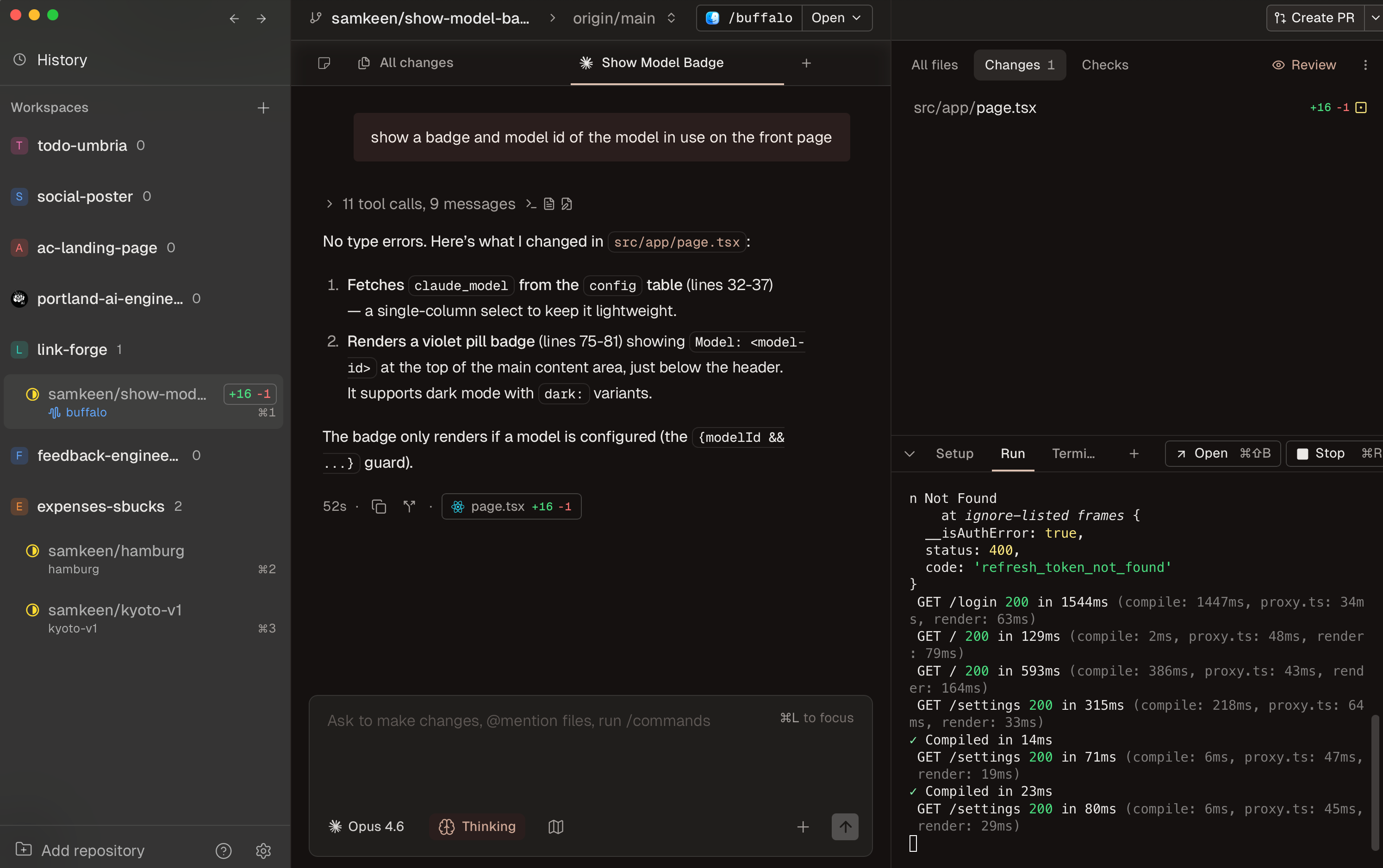
Conductor uses the official Claude Code SDK, not a custom harness. As one of the team members confirmed publicly: it’s the same quality as native Claude Code, with an orchestration layer on top. Recently they added OpenAI Codex as a selectable model alongside Claude, which the team describes as useful for precise, surgical edits that complement Claude’s broader reasoning.
The application is currently free, funded by seed capital from Y Combinator, with future monetization planned around team collaboration features.
The Workflow in Practice
Here’s what my typical day looks like with Conductor.
I open the app and my workspaces from yesterday are exactly where I left them. This sounds trivial, but it matters. If your laptop reboots overnight or you had a dozen terminal sessions open, rediscovering that state can be painful. Conductor persists everything: the chat history, the workspace state, the branch context. I pick up where I left off without archaeological excavation.
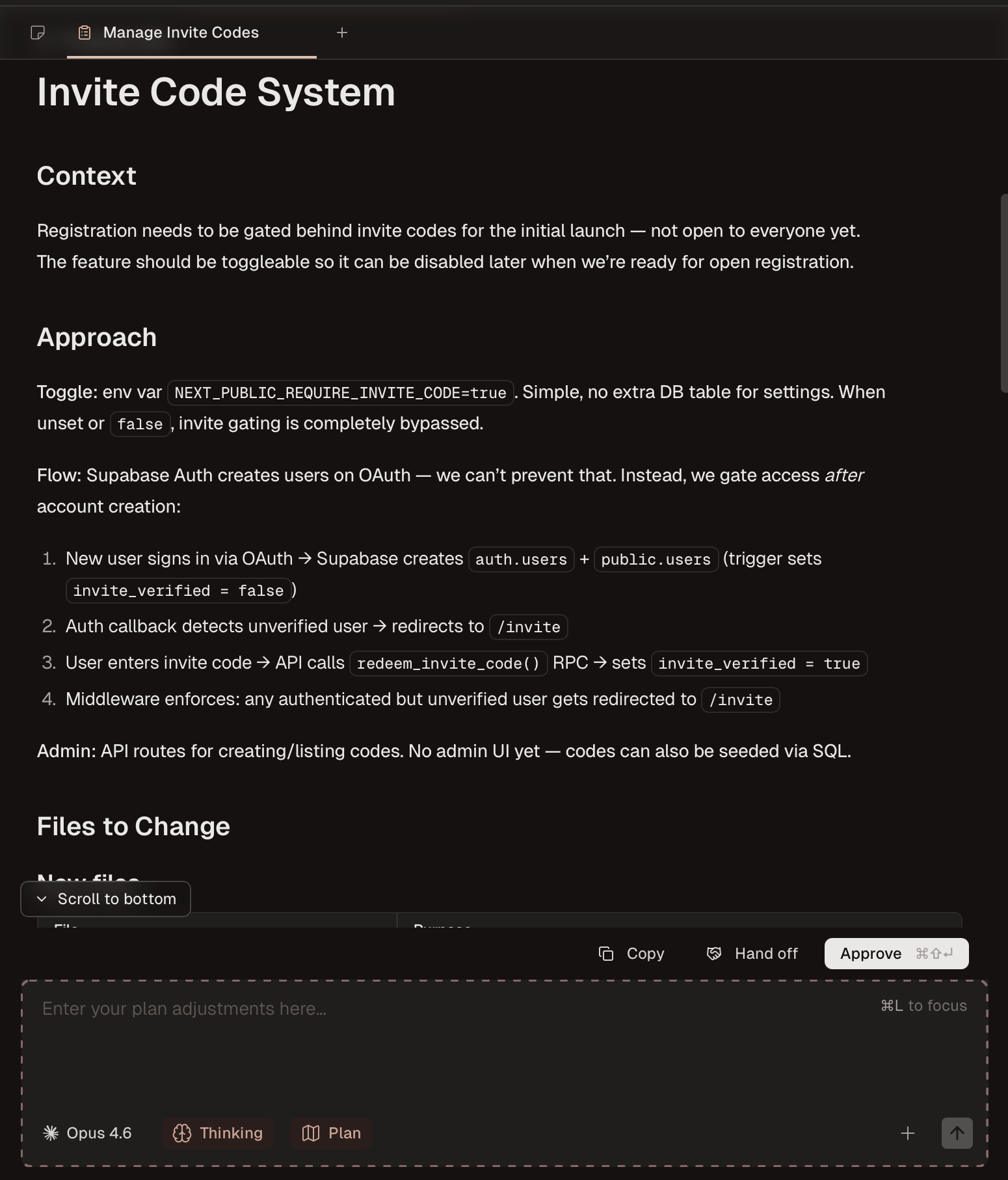
For any given task, I always start in plan mode. This is Claude Code’s native plan mode, but Conductor surfaces it as a first-class part of the workflow. I describe what I want, the agent proposes a plan, I review it, and then I approve it before execution begins. Instead of watching an agent sprint off in a direction I might not want, I’m reviewing the approach first. It takes extra time up front and saves significant rework later. Once the plan is approved, I let the agent run while I switch to another workspace and start a different task.
The parallel execution is the headline, and it delivers. The workspace isolation means I’m not worried about one agent’s file changes corrupting another’s work. Each workspace is its own branch, its own world.
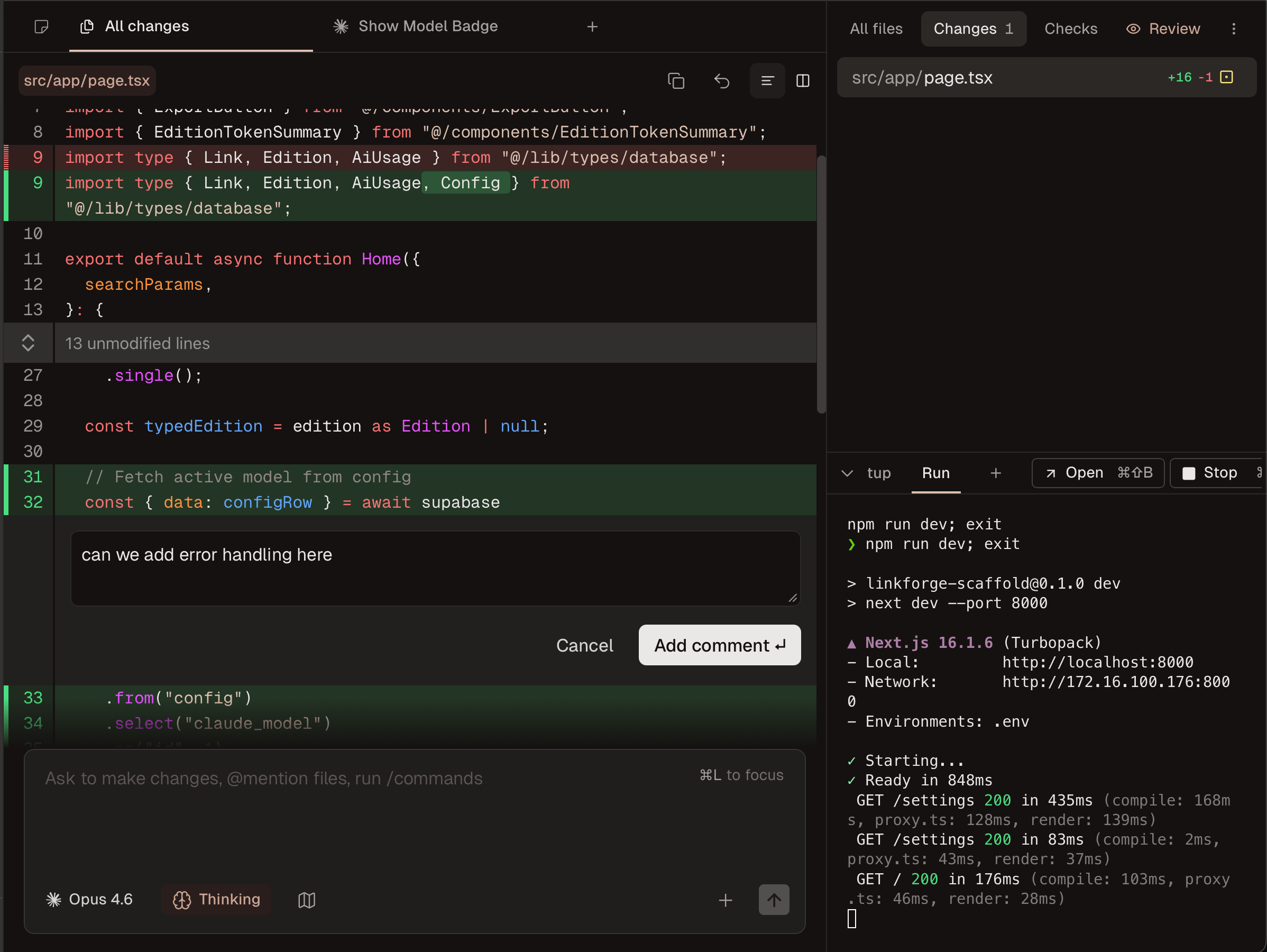
When an agent finishes, I review its work through the built-in diff viewer. Yes, if you’re using Claude Code inside VS Code, you already have a diff view. The difference here is context. When you’re supervising five agents across different features, having every agent’s output reviewable in one place changes the dynamic. You’re not switching between editor windows trying to remember which agent was doing what. The review step is centralized, and that centralization is what keeps you from rubber-stamping changes you don’t fully understand.
Better still, you can comment directly on the diff and the agent will pick up those comments as follow-up instructions. This is a pattern I first saw in Google’s Antigravity, and it makes the review step genuinely interactive rather than a binary accept-or-reject.
There’s also a todo system tied to workspaces. Before merging, you can set pre-merge checklists, and Conductor blocks the merge until every item is checked off. It’s a small feature, but it enforces the discipline that parallel execution makes easy to skip. When you have five agents producing changes, the temptation to merge fast is real. The checklists slow you down at exactly the right moment.

Checkpoints capture snapshots of the codebase at each conversation turn. If Claude goes sideways on turn four, I can revert to any previous state. It’s local Git references under the hood, independent of my actual commit history. The caveat: reverting permanently deletes everything after the selected point. It’s an undo, not a branch.
The PR workflow ties it together. I review the final state of the workspace (or have a Conductor-provided review agent perform the review), then create a pull request directly from Conductor. If CI checks fail, Conductor assists with fixes. The whole loop, from plan approval through PR merge, lives in one interface.
What It Doesn’t Do
Conductor is deliberate about the boundaries it draws, and those boundaries say a lot about what it thinks the product actually is.
It’s not an editor. When you need to write code by hand, Conductor sends you to Cursor or VSCode or whatever you prefer. It doesn’t try to replicate syntax highlighting, file trees, or refactoring tools. It’s not a CI system either. Build, test, and deploy pipelines stay in GitHub Actions or whatever your team already uses. And it’s not a team code review tool. There are no approval workflows, no multi-reviewer assignments, no merge gates beyond the ones you set yourself.
What Conductor owns is the orchestration and supervision layer. It’s the place where you define tasks, monitor execution, review results, and push changes upstream. Everything else it delegates to tools that already do those jobs well.
It’s early software, and that shows in places. I’ve had a couple of crashes, though app state was intact on restart. The online docs can be incomplete, but the app is discoverable enough thanks to its focused scope. There’s no sandboxing, so agents run with your full user permissions. It’s macOS-only for now. And early adopters may remember the GitHub permissions issue at launch, where the initial OAuth scope was far too broad. The team shipped fine-grained permissions within days, which says something about their responsiveness.
Despite the rough edges, the constraints feel intentional rather than accidental. The bet is that managing agents is a distinct activity that deserves its own purpose-built environment.
Beyond Conductor: Agent Orchestration Environments
Conductor matters on its own merits, but it matters more as a data point in a larger shift. It’s not alone. DevSwarm is building a similar multi-agent orchestration layer. Google’s Antigravity contains an “Agent Manager” for coordinating AI coding agents. OpenAI’s Codex app takes a different approach but targets the same fundamental problem: developers running multiple AI agents need better tools for managing them. The fact that multiple companies are converging on this space independently suggests we’re looking at a category, not a product.
A note on naming: Google also recently released a Gemini CLI extension called “Conductor” that handles context-driven development. Completely different product, same name. If you’re searching for the tool discussed here, it’s conductor.build.
Addy Osmani recently articulated the evolution from “conductor” (single agent, synchronous, human-driven) to “orchestrator” (multiple agents, asynchronous, human-supervised). He explicitly cited Conductor.build as an example of the orchestrator paradigm. The implication: engineers shift from implementers to managers of AI teams, emphasizing specification writing, architecture, and validation over hands-on coding.
Steve Yegge went further, declaring the IDE will be gone by 2026, arguing developers are 9-12 months behind the AI curve. That prediction may be aggressive, but the direction feels right. The traditional IDE, a text editor with a file tree and integrated terminal, was designed for humans who write code. What happens when the primary authors are agents?
What Conductor and its peers may represent isn’t an IDE replacement but something adjacent. Call it an Agent Orchestration Environment (AOE). Not where you write code, but where you manage the things that write code. The developer’s role shifts from typing keystrokes to defining objectives, constraints, and quality bars, then auditing outputs. If that sounds like project management, you’re not wrong. The difference is that the “team” works in seconds, the “sprints” last minutes, and the review cycles happen in real time.
This isn’t purely theoretical. Builder.io’s analysis of the agentic IDE landscape identified three interface paradigms: CLI-focused (Claude Code, Aider), VS Code-based (Cursor, Windsurf, Kiro), and visual/hybrid (Conductor, Firebase Studio). Their prediction: agentic behavior becomes table stakes, not a differentiator. The market hasn’t converged on how agents should integrate into workflows, only that they must.
The counter-narrative is worth noting. Cursor, Windsurf, and Kiro are doubling down on the IDE paradigm with AI deeply embedded. The “IDE is dead” thesis and the “IDE evolves” thesis coexist, and the market hasn’t picked a winner. Conductor is betting on the former. The bet may be early, but it’s not unfounded.
Who This Is For
Conductor fits a specific developer profile. You’re already using Claude Code and you’ve moved past the “let me try AI for autocomplete” phase. You’re comfortable with agents making real changes to your codebase. You’ve outgrown the terminal-per-agent workflow and you want something more structured for reviewing and merging the output.
The New Stack’s hands-on review observed that this workflow style suits senior devs and tech leads whose workday is a series of interruptions, rather than developers who need deep flow states. That tracks with my experience. Conductor isn’t for the 4-hour focused coding session. It’s for the day when you have eight things that need to move forward and you’d rather supervise five agents than context-switch through them sequentially.
Where This Lands
After a month of daily use.
Conductor provides structure around a workflow that already existed in my head: define a plan, approve the plan, let the agent implement, review the results, push a PR, merge. The GUI and persistence make that loop reliable instead of fragile.
The parallel execution works. The workspace isolation works. The review workflow works. What you accept is early software, macOS-only, and another tool in the chain. If you’re already juggling multiple agents in terminals, that’s an easy trade.
What matters more than any individual feature is the category Conductor is helping to define. The Agent Orchestration Environment isn’t a finished concept. It’s a hypothesis being tested in production by tools like Conductor, DevSwarm, and others, by developers like me, and by a market that hasn’t decided what the post-IDE world looks like.
Whether Conductor wins this market matters less than what the AOE looks like in 6 months, 12 months. Today these tools manage individual coding agents on isolated branches. The next step is agents that coordinate with each other, that understand dependencies between tasks, that can rebase and resolve conflicts across workspaces without human intervention. The orchestration layer is where that intelligence will live. Not in the IDE, not in the terminal, but in the thing that sits above both. That’s the bet, and the early returns are promising.