


You’ve seen the announcement about Skills for Claude Code. Another AI feature drop. Another promise to change everything. The skepticism is healthy. But before you add this to your ‘check out someday’ pile, here’s what actually matters: Skills let you encode your team’s workflows once and have Claude apply them consistently. Not revolutionary, but genuinely useful.
I’ve been experimenting with Skills since they released to the public. Typical test: could Claude recognize when to create a PR without being told? After encoding my PR workflow in a Skill, I worked through a bug fix naturally. Claude recognized the completion pattern in our conversation, loaded the Create PR skill, and executed the workflow perfectly. No command needed. That’s when the potential for skills became clearer for me.
Here’s the practical reality (in the context of Claude Code): Skills are lightweight workflow recipes that live in your project ([project]/.claude/skills/) or globally (~/.claude/skills/).

YAML frontmatter for metadata, markdown for instructions, optional scripts for deterministic operations, plus any additional reference files for expanded context. Claude recognizes when to apply them without explicit commands. This post shows you exactly how they work, when they beat slash commands, and how to build your first one today.
From Slash Commands to Skills: Building on What You Know
If you’re using Claude Code, Skills might sound familiar to slash commands. Both are markdown files encoding your workflows. With slash commands, you type /commit to trigger your commit workflow. You type /create-pr to trigger your PR workflow. Explicit, imperative, predictable. You control exactly when they execute.
Slash command workflow:
You: Tests are passing, implementation looks solid.
You: /create-pr
[Context switches to PR creation]
Claude: What type of PR is this?
You: Feature
Claude: [Creates PR following generic template]
[Context switches back]
Skills extend this model in a crucial way. Instead of you deciding when to trigger an action, Claude recognizes patterns and applies your encoded workflows automatically. You work naturally, Claude orchestrates intelligently.
Skills workflow:
You: Tests are passing, implementation looks solid. Ready for review.
Claude: Creating feature PR with your team’s template...
    [Shows PR with your standards applied]
Claude: PR #147 created.
With Skills, you know Claude will use your encoded process, not improvise. This also means you don’t need to stuff PR creation instructions into CLAUDE.md, keeping that file focused on broad principles rather than specific workflows. This is progressive disclosure at work, a concept we’ll explore more below.
Slash commands still have their place. Use them when you want explicit control over timing. Skills shine when you want consistent application of your workflows without micromanaging every trigger.
Worth noting: The Skills pattern extends beyond Claude Code. It’s just markdown files with YAML frontmatter in designated folders. Add a system prompt to any LLM explaining the Skills discovery process (scan ./skills/ directories, read YAML metadata, load full instructions when patterns match) and you’ve got the same capability. Claude Code implements this natively, but the pattern itself is LLM-agnostic. Your encoded expertise isn’t locked to one platform.
Progressive Disclosure: Skills Load Just-in-Time
Claude scans your skill directories on startup, reading just the YAML metadata (name and description) from each SKILL.md file. This stays in context, typically 100 words per skill. When your conversation matches a skill’s pattern, Claude loads the full instructions and executes the workflow.
Pro tip: Add this line to your
CLAUDE.mdfor reliable skill utilization:Review the Skills you have available for fulfilling user requests
This loading strategy represents progressive disclosure, a key concept from Anthropic’s best practices. Instead of cramming all possible workflows into Claude’s context upfront, Skills load just-in-time:
Metadata (always loaded): ~100 words per skill
SKILL.md body (loaded when triggered): <5,000 words
Reference files (loader as needed): These are optional files which would be cited in
SKILL.mdto give expanded context as needed.Bundled scripts (loaded as needed): These are optional scripts which are executed but their code is never loaded into context.
A Create PR skill might include detailed instructions in SKILL.md (1,000 tokens) and a references/pr-best-practices.md file (1,500 tokens), but they only consume tokens when actually needed. At rest, just the metadata (~50 tokens). When triggered, the full context loads (+1,000 tokens) and the referce file is only loaded if the LLM deems it necessary for the current task. This efficiency compounds: ten skills cost ~500 tokens idle versus ~25,000 if all instructions lived in CLAUDE.md.
The structure stays simple:
create-pr/
├── SKILL.md           # YAML metadata + instructions
├── scripts/           # Executable code (bash, python)
└── references/        # Docs loaded as needed
Real Skills in Production: Create PR Example
I built a Create PR skill using Anthropic’s skill-creator skill. Yes, Skills can build Skills. It’s meta all the way down. If you want to understand Skills deeply, read the actual skill-creator’s SKILL.md file. That file is Anthropic’s authoritative description of Skills, written for LLMs but perfectly readable by humans.
I gave the skill-creator specific requirements: use the GitHub CLI, ensure it’s installed, follow our team’s PR standards. Claude and the skill-creator handled the rest, including choosing to leverage progressive disclosure by creating a separate reference file:
skills/create-pr/
├── references/
│   └── pr-best-practices.md
└── SKILL.md
The lightweight metadata:
---
name: create-pr
description: Create well-structured pull requests by analyzing
  git diffs, determining appropriate PR metadata, and using
  the GitHub CLI. Used when user wants to create a PR, needs
  help with descriptions, or streamline PR process.
---
The workflow it encodes:
Verify
ghCLI is installed, prompt to install if missingCheck repository state and unpushed commits
Analyze diff to determine PR type (feature/bugfix/refactor)
Generate title following team conventions
Compose description using our template with sections for changes, testing, and notes
Show complete PR details for user confirmation
Create PR with proper labels and assignees
View the entire Create PR skill here
This isn’t revolutionary automation. You could script this. But here’s what makes Skills different: Claude decides when this pattern applies. Mid-debugging session, you mention “this fix is ready for the team” and Claude recognizes the PR moment. The LLM becomes the orchestrator while your Skill provides the expertise.
Token efficiency through utility scripts:
As mentioned, Skills can include utility scripts that execute without entering the context window. Without Skills, I’ve watched Claude:
Write scripts to
/tmpExecute the script
Delete the script
Wasteful of both tokens and time.
With Skills, these scripts sit ready:
# In scripts/check-pr-status.sh
#!/bin/bash
gh pr status --json state,number,title 2>/dev/null || echo “No PR found”
Claude simply executes the script rather than crafting it from scratch each time. Faster execution, fewer tokens, deterministic results.
When to Use What: A Developer’s Decision Framework
Not everything should be a Skill. Here’s how to choose your tool:
Skills excel at: Discrete workflows where Claude should recognize the pattern. PR creation, changelog generation, deployment checklists. Think “repeated workflow with standards” rather than “single command.”
Slash commands win for: Immediate actions where you want explicit control over timing. When you want to decide exactly when something happens, slash commands give you that control.
MCP handles: The tools aspect of MCP sounds similar to Skills. As Simon Willison notes in “Claude Skills are awesome, maybe a bigger deal than MCP”, there’s similarity in that both are tools for agents. But MCP is a protocol representing dynamic systems, often entire SaaS applications (and goes beyond tools). Skills are more discrete by design (Create PDF, Apply Brand Standards), and a simple set of static files. For a deeper dive on MCP, see my previous post on building for the agentic era.
CLAUDE.md remains essential for: Broad, always-active preferences. Your team’s code style, framework choices, naming conventions. Not tasks, but principles that apply across all interactions.
The tools complement each other. Skills for workflows, slash commands for explicit control, MCP for dynamic systems, CLAUDE.md for persistent context.
Production Realities and Mitigations
As with any mechanism, there are tradeoffs worth considering before you adopt Skills:
The static drift problem is real. Your Skill documents an API. The API changes. Your Skill doesn’t auto-update. Welcome to drift, a fundamental challenge with file-based configurations.
Mitigation strategies I’m using:
Point to external documentation rather than copying it
Reference MCP servers for dynamic endpoints
Keep Skills in source control as single source of truth
Regular review cycles for critical Skills
Anthropic’s mcp-builder skill demonstrates the documentation approach:
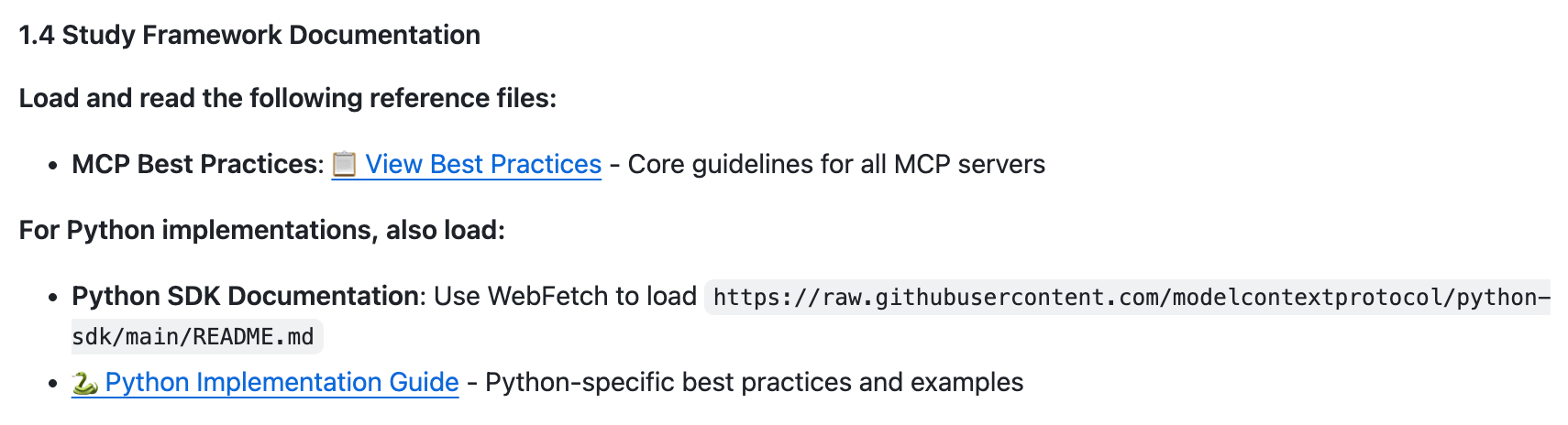
Security requires standard hygiene. Third-party Skills can contain executable scripts. Review the scripts/ directory before using. Check what’s being executed. Apply the same paranoia you’d use for any external code. This isn’t unique to Skills. It’s computing 101.
Getting Started Monday Morning
Ready to encode your first workflow? Here’s your action plan:
Install the skill-creator (~ 2 mins):
# Clone the Anthropic skills repository
git clone https://github.com/anthropics/skills/ ~/anthropic-skills

# Copy skill-creator to your global skills directory (or project if you prefer)
cp -r ~/anthropic-skills/skill-creator ~/.claude/skills/
Create your first Skill (~ 5-10 mins): Tell Claude: “Help me create a skill for [your repeated workflow]“
Claude will walk you through questions, generate the structure, and teach you the pattern.
If you have a set of slash commands, I would recommend you look there first for Skill candidates. Beyond that any discrete, repeated task is worth investigating.
Build one. Use it for a week. Refine based on actual use. Then build another.
The Subtle Shift That Matters
This isn’t about replacing bash scripts or eliminating slash commands. It’s about encoding your refined patterns in a format that gets smarter as models improve.
Today, you say “time for a PR.” Tomorrow, Claude might recognize that completing a feature naturally leads to creating a PR, running tests, and requesting review. All using your encoded workflows. You’re not just automating. You’re teaching the model when patterns apply.
As models improve at reasoning, your Skills become more valuable without you changing them. The expertise you encode today scales with tomorrow’s capabilities.
The shift from imperative (”do this now”) to declarative (”this is how we do things”) isn’t revolutionary. But it means Monday morning, instead of typing the same commands and explanations, you’re encoding expertise once and letting Claude recognize when to apply it.
That’s not hype. That’s just better infrastructure for how we already work.
Key resources:
skill-creator SKILL.md (best single source for understanding Skills deeply)
Ready to encode your first workflow? Grab the Create PR skill example and adapt it to your team’s standards. Questions about Skills or want to share what you built? Hit reply. I read everything.