


A recent product email listed roughly ten Claude Code and platform updates. If you’ve been heads-down shipping and haven’t tracked every changelog, this is your catch-up guide. The platform moves fast enough that your mental model of what Claude Code can do may already be out of date.
Taken individually, these are incremental improvements. Taken together, they reveal a coherent architecture: code execution as the foundational primitive, context management as the core engineering problem, and multi-surface access as the interface layer. The underlying shift is concrete. Claude used to generate text about solutions. Now it executes them and verifies the results. That shift underpins everything below.
The Multi-Surface Shift
If you’ve been using Claude Code primarily from the terminal, the biggest shift you may have missed is how many surfaces it now covers. The Claude desktop and mobile apps now have a dedicated Code tab. Claude Code on the Web runs sessions in Anthropic-managed cloud VMs, no local install required. VS Code and JetBrains extensions embed it in your IDE. And with Remote Control (more on this below), you can connect any of these surfaces to a session running on a machine of your choosing. The underlying agent is the same one you know. The surfaces are different entry points into it.
This matters because it changes the relationship. Claude Code stops being “a tool you sit down and use” and becomes something that’s available wherever you are. Start debugging in the terminal at your desk, switch to VS Code for visual diffs, check on progress from your phone. The conversation and context follow you.
You’re likely already familiar with CLAUDE.md, skills, hooks, and subagents. These have continued to mature, but the conceptual model hasn’t changed. What has changed is where you can access all of it. The customization you’ve built into your workflow now travels with you across surfaces.
Remote Control: The Always-Available Agent
The feature that makes the multi-surface story tangible is Remote Control. It connects claude.ai/code or the Claude mobile app to your running local session. Everything stays local. Your filesystem, MCP servers, project config. The web or mobile interface is just a window into it.
# Start a remote-controlled session
claude remote-control --name "My Project"

# Or from an existing session
/rc
Press spacebar to get a QR code for your phone. The session syncs across all connected devices. Send messages from terminal, browser, and phone interchangeably.
The architectural decision here is deliberate. Unlike Claude Code on the Web, which runs on Anthropic-managed cloud VMs, Remote Control keeps execution on your machine. Your local tools work. Your MCP connections work. You get the mobility of a cloud-based tool without giving up local control.
I’ve been experimenting with Remote Control over the past few weeks. The appeal is real. Starting a long-running task at my desk and continuing from my phone is exactly the workflow I wanted, without going the full OpenClaw route of setting up a persistent headless agent. Remote Control is the lighter-weight version of “Claude Code is always available.”
In practice, connection stability has been a challenge. Sessions drop more often than I’d like, particularly during longer tasks. This is a research preview, so rough edges are expected. The underlying idea is sound. The execution needs time to mature. I’ll keep testing it because the workflow it enables is worth the friction.
All traffic runs through the Anthropic API over TLS, using multiple short-lived credentials scoped to single purposes. No cloud VMs, no external sandboxing. Available on Pro, Max, Team, and Enterprise plans.
What’s New in the CLI
While surfaces have multiplied, the CLI itself has picked up features that change how you interact with Claude Code day-to-day. Four stand out.
Effort Controls
The effort parameter lets you dial Claude’s token spend up or down per-task. Four levels: low, medium, high (the default), and max. In the CLI, toggle it via /model and the left/right arrow keys.
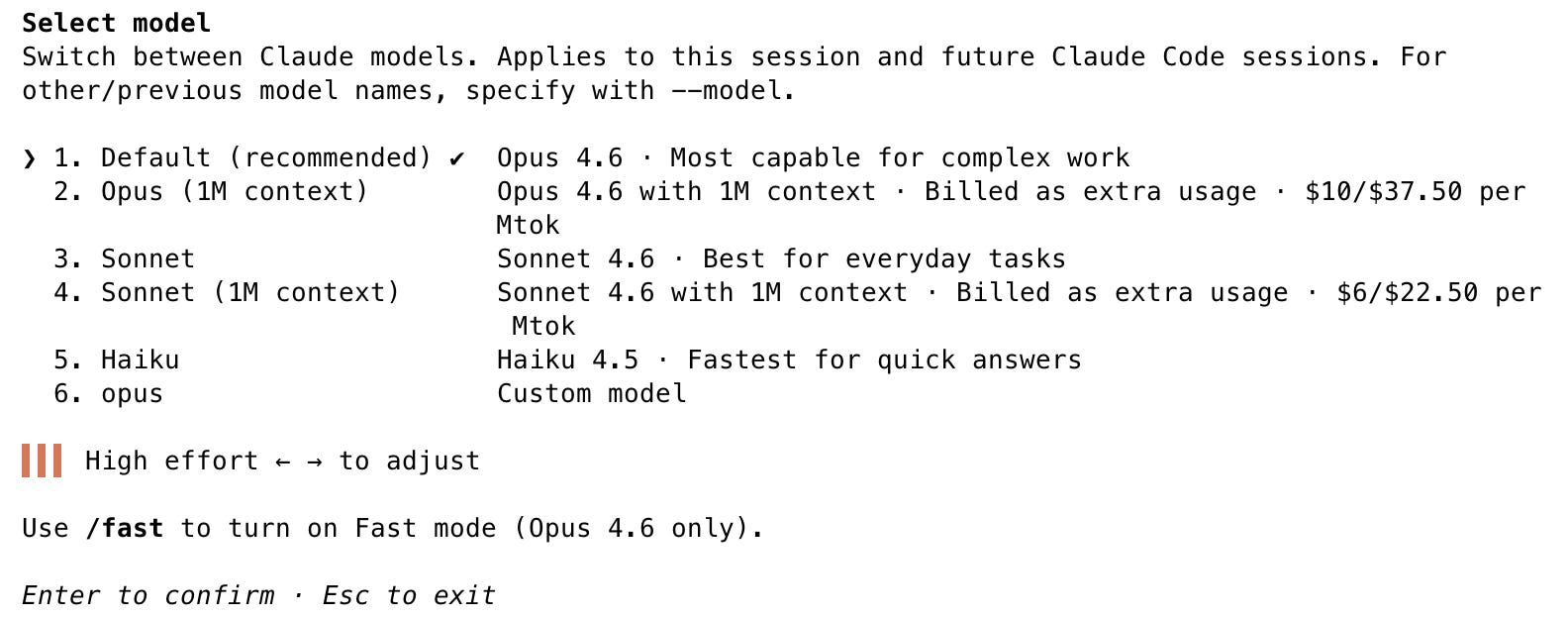
The practical guidance is straightforward. Use low for simple lookups, file reads, and quick questions. It responds faster and costs less. Keep high for the complex reasoning tasks that are Claude Code’s bread and butter. Reserve max for when you need exhaustive analysis: deep debugging sessions, architectural reviews, or thorny refactors where you want Claude to leave no stone unturned. max is Opus 4.6 only. Matching effort to task complexity is one of those small workflow adjustments that compounds over a full day of usage.
Personally, I keep mine pinned to high and don’t toggle between tasks. The reasoning-heavy work that makes Claude Code valuable rarely benefits from dialing down.
Output Styles: A Tip for New Codebases
Output styles modify Claude Code’s system prompt to change how it communicates. The default is optimized for efficient task completion. Two built-in alternatives shift the balance toward learning.
The one worth knowing about is Explanatory mode. When you’re onboarding to an unfamiliar codebase, switch to it via /output-style explanatory or through the /config menu.

/config menuInstead of just answering your questions efficiently, Claude adds educational “Insights” between responses, surfacing implementation patterns, architectural decisions, and design rationale you didn’t think to ask about.
The difference is tangible. I explored the same codebase in both modes. The default mode response gives you a clean, functional overview of how the system works. The explanatory mode response covers the same ground but surfaces design insights you’d otherwise discover only after weeks of reading code: why state tracking uses two independent axes, why authorization lives at the database layer rather than middleware, how a completeness check is decoupled as a pure function for reuse across client and server contexts.
When you’re maintaining a codebase you know well, default mode’s efficiency is what you want. When you’re ramping up on something new, explanatory mode compresses what would normally be days of code archaeology into a conversation. Switch back once you’ve built your mental model.
Agent Teams
Agent Teams are distinct from the subagents you already know. Subagents follow a hub-and-spoke model: a primary agent spawns helpers that report back. Agent Teams communicate peer-to-peer via a shared task list and direct messaging. Each teammate is a full Claude Code instance with its own context window, tools, and filesystem access.
Enable it with CLAUDE_CODE_EXPERIMENTAL_AGENT_TEAMS=1. The sweet spots: parallel code review across multiple files, competing-hypothesis debugging (two agents investigate different theories simultaneously), and cross-layer feature work where frontend and backend changes need to stay coordinated. This is explicitly experimental, so expect rough edges and known limitations. But the underlying model of peer collaboration rather than hierarchical delegation opens up workflows that subagents can’t handle well.
I just enabled this and plan to run structured experiments in future posts.
/insights
A quick power-user mention: /insights analyzes your session history and generates a report covering usage patterns, friction points, and suggested CLAUDE.md rules. The report surfaces workflow improvements you didn’t know you needed, and the suggested CLAUDE.md additions alone make it worth running
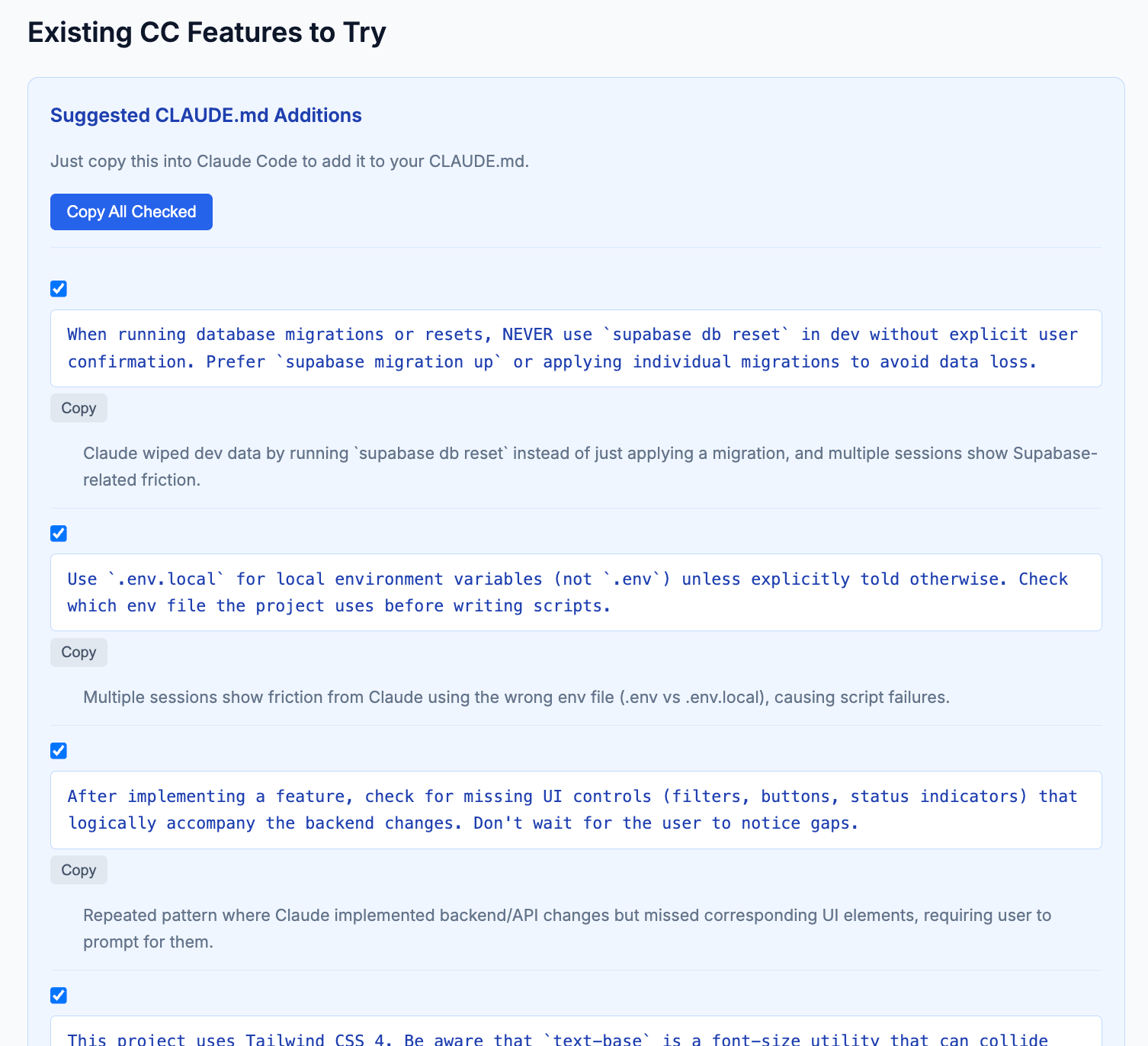
CLAUDE.md addition suggestions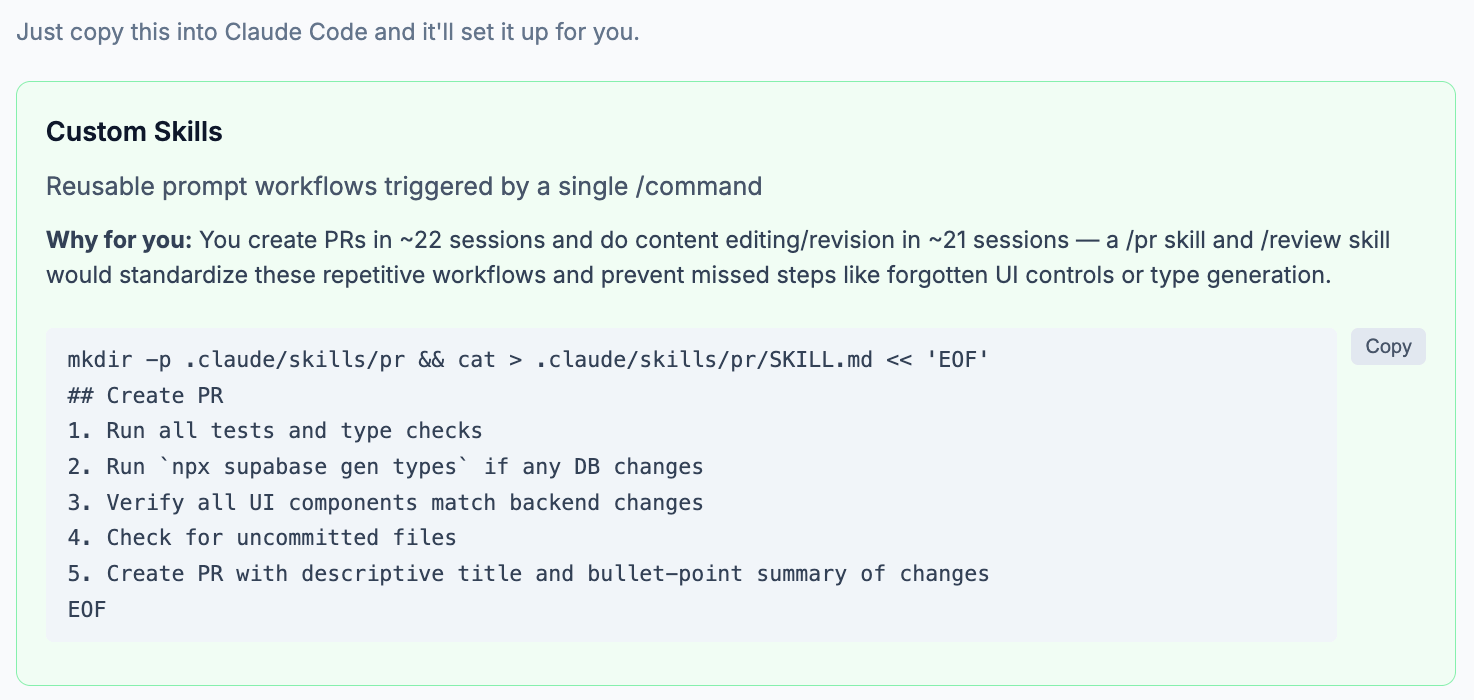
.
The Platform Underneath
If Claude Code is the tool you interact with, the developer platform is the substrate that makes it work. Even if you never call the API directly, understanding these primitives explains why Claude Code behaves the way it does and where it’s heading. The API updates over the past several months tell a coherent story, starting with the primitive that enables everything else.
Code Execution as the Substrate
You watch Claude Code run bash commands, execute tests, and manipulate files every day. The code execution tool brings that same capability to the API as a sandboxed primitive. On its own, it handles data analysis, visualizations, and calculations. Its real significance is what it enables in other features.
Dynamic filtering in web search? Code execution under the hood. Programmatic tool calling? Runs inside the code execution container. Memory operations? Same substrate.
Anthropic priced it to encourage adoption: 1,550 free hours per organization per month, $0.05/hour after that. When used alongside web search or web fetch, it’s free entirely.
Programmatic Tool Calling: Collapsing the Round-Trip Loop
Traditional agentic tool use follows a painful loop. The model decides to call a tool. The system executes it. The result goes back to the model. The model decides the next call. Each iteration requires a full inference round-trip. For tasks that need many sequential tool calls, this creates compounding latency and burns through context.
Anthropic’s engineering blog on advanced tool use quantifies the problem: in multi-step agentic workflows, inference and context costs dominate everything else.
Programmatic tool calling addresses this. Instead of looping through the model for each tool invocation, Claude writes code that calls your tools programmatically within the code execution container. A single script handles what used to require dozens of round-trips.
The mechanism is an allowed_callers parameter on tool definitions:
{
  "name": "query_database",
  "allowed_callers": ["code_execution_20260120"]
}
This tells Claude that query_database can be invoked from within the execution environment. Claude then writes a script that loops through records, calls the tool for each, filters results, and returns only what matters.
Anthropic’s engineering deep dive walks through a concrete example. Imagine an expense compliance check across 20 employees. The traditional approach requires 20 separate model round-trips, each pulling 50-100 expense line items into context. With programmatic tool calling, Claude writes a single script that runs all 20 lookups, filters for budget violations, and returns only the employees who exceeded limits. The 2,000+ expense line items never touch the context window. What Claude needs to reason over shrinks from hundreds of kilobytes to a handful of lines. Token consumption fell 37% on complex research tasks in Anthropic’s internal testing.
The pattern has already made it into shipping products. Claude for Excel uses programmatic tool calling to read and modify spreadsheets with thousands of rows. Rather than routing cell data back through the model, the code processes it inside the container and returns only the final results.
On agentic benchmarks like BrowseComp and DeepSearchQA, adding programmatic tool calling on top of basic search tools was the key factor that fully unlocked agent performance. Not a marginal improvement. The factor that made the difference.
I haven’t used programmatic tool calling directly. But this is the kind of capability worth knowing exists before you need it. When you hit a workflow that requires looping through dozens of tool calls, the instinct is to build that orchestration yourself. Knowing the platform handles it saves you from reinventing it.
Web Search with Dynamic Filtering
Another example of code execution enabling higher-level features: the web search tool (web_search_20260209). Before dynamic filtering, when Claude searched the web it pulled all results into context and reasoned over the full content. Most of that content was irrelevant boilerplate. Token costs scaled with volume, not relevance.
Dynamic filtering changes this. Claude writes and executes code to filter search results before they enter the context window. Only relevant content is kept. Everything else is discarded.
In Anthropic’s context management evaluation, a 100-turn web search workflow with context editing (the mechanism underlying dynamic filtering) reduced token consumption by 84% while completing workflows that would otherwise fail from context exhaustion. Those are significant gains from what is essentially a preprocessing step.
If you use Claude Code’s web search, you’ve likely already felt this improvement: fewer irrelevant URLs, noticeably better quality in what comes back. Dynamic filtering is the mechanism behind that change.
Configuration options include domain filtering (allowlists and blocklists with wildcard support), search limits per request, and location-based result localization. Pricing is $10 per 1,000 searches plus standard token costs.
Context as the Core Problem
A pattern emerges when you look at several of these features together: Anthropic is treating context management as the central engineering problem in LLM applications.
The Memory Tool
You already know how CLAUDE.md gives Claude Code project-level memory. If you’ve poked around ~/.claude/, you’ve seen the plan files, session data, and auto-memory that Claude Code maintains locally. The memory tool brings that same concept to the API as a first-class primitive. It gives Claude a file-based memory directory that persists between conversations, with commands to create, read, update, and delete files within it.
The design philosophy, as Anthropic’s context engineering guide explains, is just-in-time context retrieval. Rather than stuffing everything into the system prompt upfront, agents store what they learn and pull it back on demand. If you’ve watched your CLAUDE.md auto-memory accumulate useful context over time, this is the API-level equivalent.
The critical architectural decision: this is a client-side tool. You control where and how data is stored. Local filesystem, database, cloud storage, encrypted files. Anthropic provides the interface. You provide the storage.
When the memory tool first launched, I built a POC to explore what implicit memory management could look like. The setup: Claude autonomously decides what to remember across sessions. No explicit “save this” commands. The agent evaluates each conversation, writes what it deems worth retaining to files in a ./memories/ directory, and retrieves relevant context in future sessions. The interesting finding: with the right system prompt, Claude doesn’t just store facts. It reorganizes its own memory files, merges related notes, and self-heals from storage errors. The companion repo has the full implementation if you want to experiment.
Two companion features extend the memory tool’s utility. Context editing automatically preserves important information to memory files when conversation context grows too large. Compaction (server-side summarization) paired with memory ensures nothing critical is lost during automatic summarization. Together, they enable workflows that would otherwise exceed context limits.
Structured Outputs
If you’ve written JSON.parse() on an LLM response and hoped for the best, structured outputs are the fix. Two complementary guarantees ensure Claude returns valid, schema-conformant JSON. JSON outputs let you specify a schema and get guaranteed conformance. The SDKs make it ergonomic. Python gets Pydantic integration via client.messages.parse(). TypeScript gets Zod support via zodOutputFormat.
response = client.messages.parse(
    model="claude-opus-4-6",
    max_tokens=1024,
    messages=[{"role": "user", "content": "Extract contact info: ..."}],
    output_format=ContactInfo,  # Pydantic model
)
contact = response.parsed_output  # Typed, validated
Strict tool use adds strict: true to tool definitions, guaranteeing that tool inputs strictly follow input schemas and tool names are always valid. No more passengers: "2" when the schema says integer.
This eliminates an entire category of bugs. If your LLM output feeds into downstream systems (databases, APIs, dashboards), structured outputs mean you can stop writing defensive parsing code. If you’ve been writing your own validation-and-retry layer for LLM JSON output, you can stop. GA on Claude API and Amazon Bedrock across the current model lineup.
The Cost Optimization Layer
Two features address the economic side of context management.
Auto-caching replaces manual cache breakpoint placement with a single cache_control field. The system manages where to cache in multi-turn conversations automatically. Cache hits cost 10% of standard input price. For Opus 4.6, that’s $0.50/MTok versus $5/MTok uncached. It pays for itself after one read with the 5-minute TTL or two reads with the 1-hour TTL. No-brainer. Turn it on.
Fast mode provides up to 2.5x higher output tokens per second for Opus 4.6 at premium pricing ($30/$150 per MTok). The headline detail: fast mode includes the full 1M context window at flat pricing. At standard speed, requests exceeding 200K input tokens incur premium pricing (2x on input, 1.5x on output). Fast mode eliminates that surcharge, making cost predictable for large-context workloads. Currently in research preview, Opus 4.6 only.
I’ve tried it. The speed is noticeable, but the cost premium hasn’t justified itself for my usage. The slower output actually gives me time to hop to another task while Claude works, which suits my workflow. If you need rapid iteration within a single session, the calculus is different.
Claude Code Security Scanning is in limited research preview for Enterprise and Team customers. It scans codebases for vulnerabilities and provides patch suggestions for human review. Access requires applying through Anthropic. Separate from the general security architecture (permission-based access, sandboxed bash, prompt injection protections) that ships with Claude Code by default.
What This Adds Up To
Step back from the individual features and the architecture becomes clear.
Code execution is the foundation. It’s the primitive that enables dynamic filtering, programmatic tool calling, and memory operations. Without it, Claude generates text about solutions. With it, Claude executes solutions and verifies the results.
Context management is the core engineering problem. The memory tool, auto-caching, context editing, compaction, dynamic filtering. These all address the same fundamental constraint: context is both the most powerful and most expensive resource in LLM applications. Anthropic is building tools that manage what’s in the window and what isn’t, because getting this right determines whether an agent can handle complex, multi-step work.
Claude Code is the multi-surface interface that ties it together. Terminal, IDE, desktop, web, mobile, remote control. The bet is that developers want AI assistance that follows them across surfaces, not a tool that anchors them to one workstation. Remote Control is the clearest expression of this: your local machine, accessible from anywhere, with the full context of your project.
The pricing strategy reinforces the architecture. Free code execution with web search. Flat-rate 1M context in fast mode. Auto-caching that requires one line of configuration. When the cost model is simple, developers build more ambitiously. When it’s unpredictable, they build defensively. Anthropic appears to understand this.
For developers already using Claude Code, the multi-surface story, Remote Control, and CLI-level controls like effort tuning and Agent Teams are the most immediately impactful updates. For API developers building agentic applications, programmatic tool calling and the memory tool change what’s architecturally possible. Structured outputs and auto-caching are the kind of features that don’t make headlines but eliminate entire categories of production bugs and cost surprises.
None of this is “the future” in some abstract sense. These features are GA or in research preview today. The platform underneath Claude Code is maturing faster than most developers realize. Whether you start with the CLI controls, the multi-surface workflow, or the API primitives depends on what you’re building. But the catch-up window is now.